---
title: "Neon is unreal... but I can't see my usage"
description: "Gemini 4 Neon floored me so hard I burned a 5-hour quota in 2 hours. Then I used Neon to build AgentBar, a small macOS HUD that shows live quota across Antigravity, OpenCode Go, Claude, and Codex."
pubDate: "2026-11-22"
heroImage: "/agentbar-hud-multiprovider.png"
typora-root-url: ../../../public
---
I caught Google's AI Pro plan on a half-price Black Friday deal and gave Gemini 4 Neon a try. **It floored me**.
It feels like Claude Opus 5.5, just faster and much less verbose. I don't need `caveman` to keep my sanity. Even when it sneaks an — in here and there, it stays objective, gives direct answers, and skips the endless wall-of-text explanations.
Because I trusted it almost right away, I threw real work at it:
- I updated my fleet scripts to sync config and tooling across all my machines, and it got everything right on the first shot.
- I spent extra $10 in API credits to get the [myarc.dev](https://myarc.dev) alpha out the door, simply because I trusted the output enough to keep going, and had hit the 5h limit.
- On Neon High, I got so carried away that I burned through a 5 hour quota in 2h.
## Slowing down the burn
Running Neon on High for everything was clearly unsustainable. I dropped it to Medium as my lead model and started delegating the rest:
- Routine and mechanical tasks (boilerplate, edits, blog drafts, test runs, sweeps) go to DeepSeek 4.1 Flash through [OpenCode Go](https://opencode.ai/docs/console/go/).
- Heavy multi-file changes and tricky debugging go to Claude Opus 5.5 through [Antigravity](https://antigravity.google) (it has separate usage within `agy`).
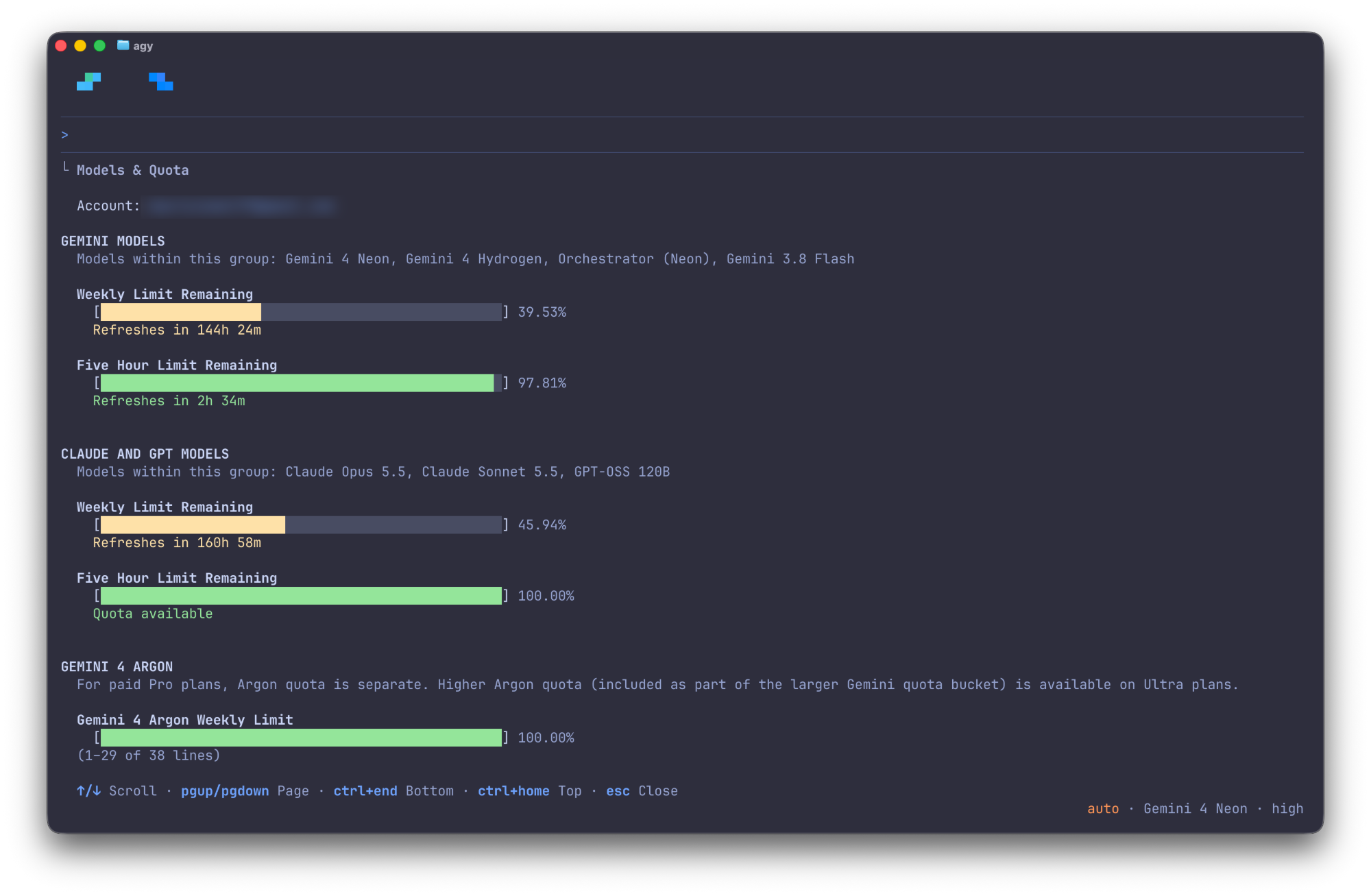
That setup feels much better and stretches the quota way further. The catch is that working across Antigravity inside [T3 Code](https://github.com/pingdotgg/t3code) meant I had no idea how much 5-hour or weekly quota I had left without opening `agy` in a terminal and running `/usage`.
The only way to check Antigravity quota before: opening agy in a terminal and scrolling /usage.
## Having Neon build a HUD for its own usage
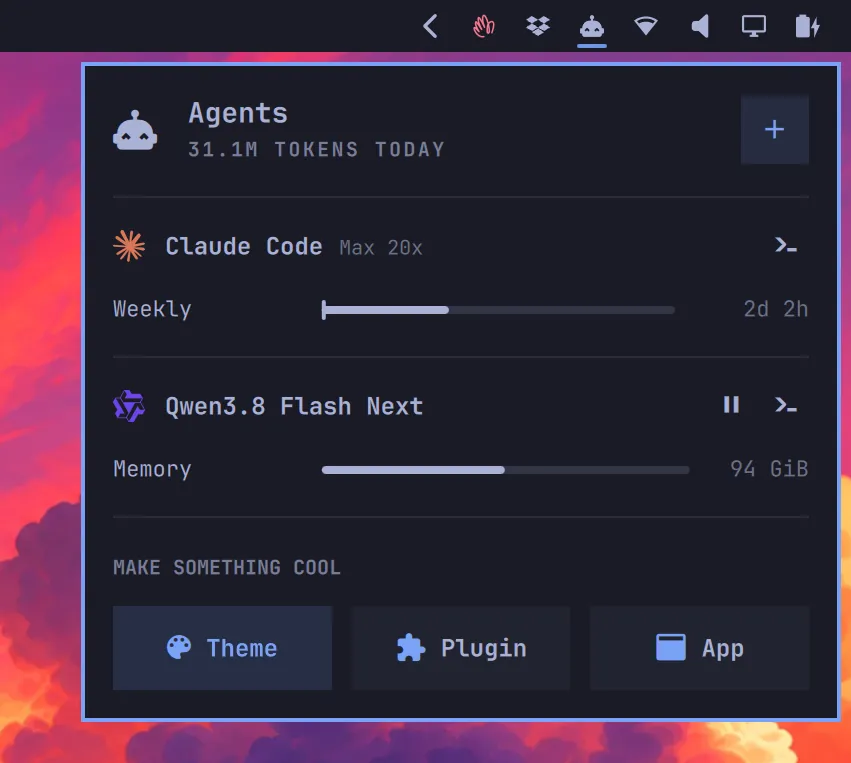
I've been using [Omarchy](https://omarchy.org)'s Agents panel on Linux for a while. One compact view, all your providers, clear bars with reset timers.
Omarchy's Agents panel: multiple providers stacked cleanly, with pace markers on the bars.
Since I'm on macOS most of the day, I wanted something with that same layout and [Raycast](https://www.raycast.com)'s floating HUD polish. So I asked Neon to help me build [AgentBar](https://agentbar.fyi): a small Go collector paired with a native SwiftUI menubar and HUD app.
The Go collector gathers usage concurrently across Antigravity (`agy /usage`), OpenCode Go (`opencode api`), [Codex](https://github.com/openai/codex) (`~/.codex/sessions`), and [Claude Code](https://claude.ai/code) (`claude /usage`), skips any CLI you don't have installed, and records snapshots to a local SQLite database so I can query my burn history whenever I want.
The macOS app wraps that in a floating translucent panel (`⌥⇧A` from anywhere, `⌘R` to refresh, `Esc` to close).
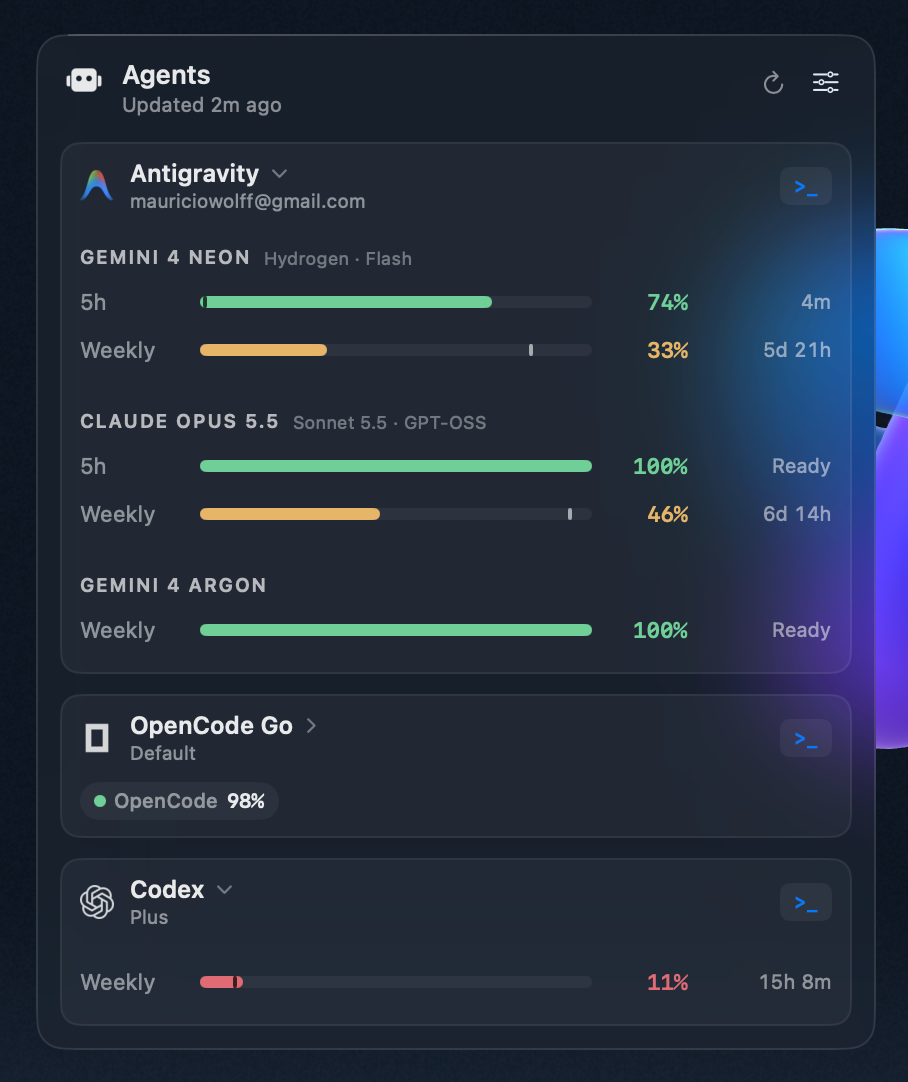
AgentBar showing Antigravity (Neon, Opus 5.5, Argon), OpenCode Go, and Codex.
## A few small touches that make it actually useful day to day:
- **Pace markers on every bar.** Each bar has a small tick showing how much time is left in the 5-hour or weekly window. If the colored bar is behind the tick, I know I'm burning faster than a steady pace. Copied from Omarchy.
- **Smart auto-expand.** Providers with plenty of headroom (like OpenCode Go at 98%) stay collapsed to a single pill. Anything under 50% (like Antigravity's weekly or Codex at 11%) expands automatically so it catches my eye.
- **Themes.** Native macOS dark and light vibrancy by default, with muted sage green, amber, and coral bars. Being me, I also had to include [Catppuccin](https://catppuccin.com) Mocha and Latte.
Having Neon build a signed, notarized macOS app just so I could keep an eye on Neon's own usage feels like a pretty good summary of where coding agents are right now. When a model is this fast and direct, small personal tools stop living on a *someday list* and just get built.
**[AgentBar](https://agentbar.fyi)** is open source on [GitHub](https://github.com/bitbonsai/agentbar), and there's a notarized macOS build on the [releases page](https://github.com/bitbonsai/agentbar/releases/latest) if you want to try it.
 It feels like Claude Opus 5.5, just faster and much less verbose. I don't need `caveman` to keep my sanity. Even when it sneaks an — in here and there, it stays objective, gives direct answers, and skips the endless wall-of-text explanations.
Because I trusted it almost right away, I threw real work at it:
- I updated my fleet scripts to sync config and tooling across all my machines, and it got everything right on the first shot.
- I spent extra $10 in API credits to get the [myarc.dev](https://myarc.dev) alpha out the door, simply because I trusted the output enough to keep going, and had hit the 5h limit.
- On Neon High, I got so carried away that I burned through a 5 hour quota in 2h.
## Slowing down the burn
Running Neon on High for everything was clearly unsustainable. I dropped it to Medium as my lead model and started delegating the rest:
- Routine and mechanical tasks (boilerplate, edits, blog drafts, test runs, sweeps) go to DeepSeek 4.1 Flash through [OpenCode Go](https://opencode.ai/docs/console/go/).
- Heavy multi-file changes and tricky debugging go to Claude Opus 5.5 through [Antigravity](https://antigravity.google) (it has separate usage within `agy`).
That setup feels much better and stretches the quota way further. The catch is that working across Antigravity inside [T3 Code](https://github.com/pingdotgg/t3code) meant I had no idea how much 5-hour or weekly quota I had left without opening `agy` in a terminal and running `/usage`.
 [Catppuccin](https://catppuccin.com) Mocha and Latte.
Having Neon build a signed, notarized macOS app just so I could keep an eye on Neon's own usage feels like a pretty good summary of where coding agents are right now. When a model is this fast and direct, small personal tools stop living on a *someday list* and just get built.
**[AgentBar](https://agentbar.fyi)** is open source on [GitHub](https://github.com/bitbonsai/agentbar), and there's a notarized macOS build on the [releases page](https://github.com/bitbonsai/agentbar/releases/latest) if you want to try it.